 Endless Cues
OSC control
Listens on UDP port 53000 and answers to QLab’s addresses, so a Bitfocus Companion or Stream Deck setup made for QLab works as it is.
/go /panic /cue/{number}/start udp 53000
Standing by · v0.1, first public build on the way
Endless Cues is an open-source cue-list app for live theatre and events, on macOS, Windows and Linux. QLab’s cue list, a sound designer’s tools, and a show you can open in a text editor.
Free and open source. Nothing to download yet. This is a first pass, not a finished QLab replacement.
01The cue list
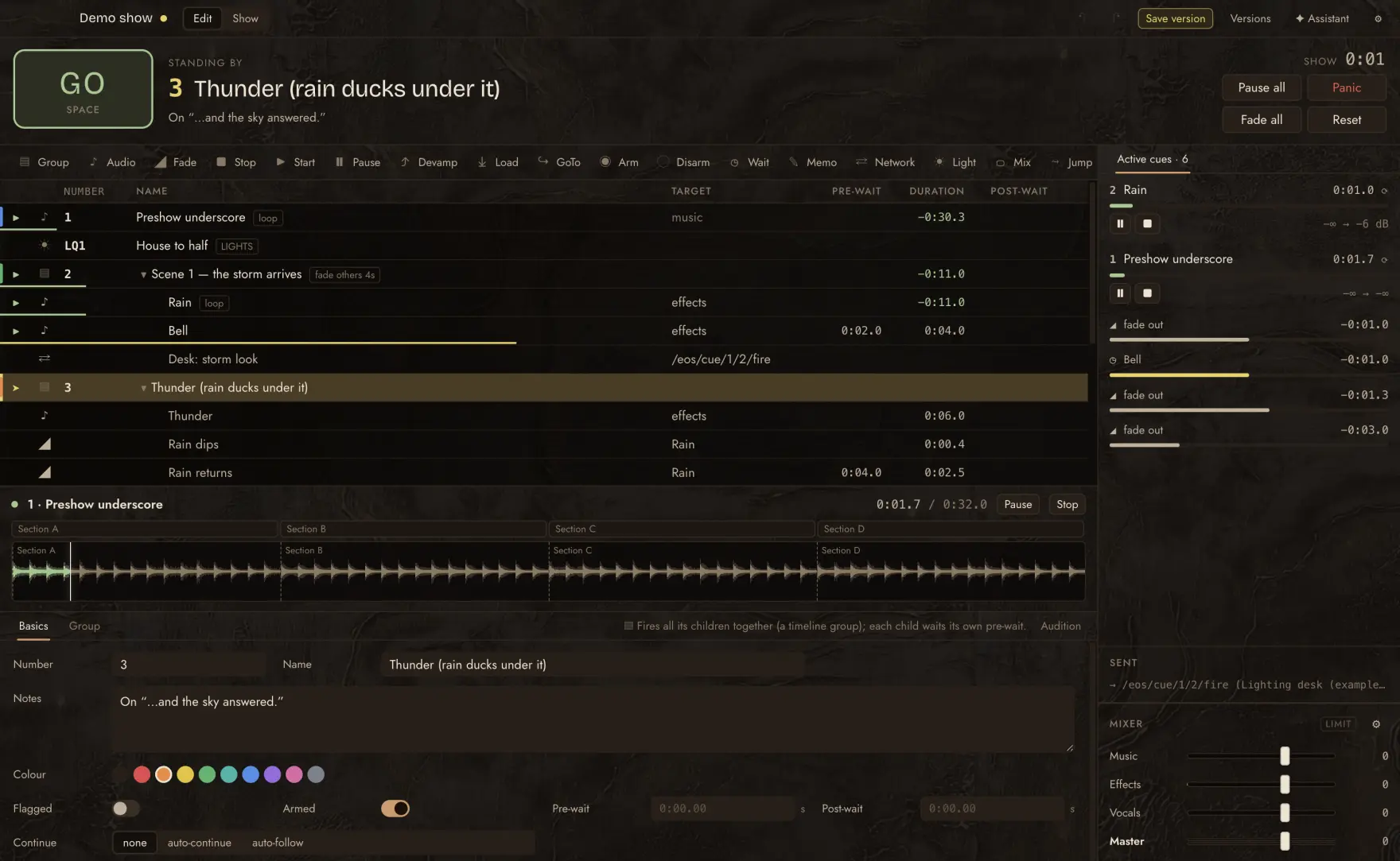
If you know QLab you know this. One GO button, a playhead, and a list of cues that run in order. Everything around the button exists so that the right thing happens when you press it, and as little as possible happens when you press it by mistake.
02Sound
A show does not run to the second. A change runs long, an actor takes the pause, and the music has to wait without sounding like it is waiting. These tools come from how DJs and Ableton users deal with that. Here they are part of the cue list.
Not yet: microphones and live ducking in the mixer. They are on the roadmap below.
03The show file
A show is a folder. In it, show.json is the whole cue list as plain, pretty-printed JSON with its keys in a fixed order, so a diff shows what changed and nothing else. Open it in a text editor. Put it in git. Send it to someone who does not have the app.
{
  "format": "endless-cues-show",
  "version": 1,
  "id": "show_e4e57c56",
  "title": "Demo show",
  …
  "lists": [
    {
      "id": "list_e28d4608",
      "name": "Main",
      "cues": [
        …
        {
          "id": "c_28493eb8",
          "notes": "On “…and the sky answered.”",
          "type": "group",
          "number": "3",
          "name": "Thunder (rain ducks under it)",
          "color": "orange",
          "children": [
            …
            {
              "id": "c_6aa41695",
              "type": "fade",
              "name": "Rain dips",
              "target": "c_09dda5b8",
              "db": -10,
              "duration": 0.4,
              "relative": true
            },
            …
          ]
        }
      ]
    }
  ]
}Every edit is saved as you make it. Save version makes a named checkpoint. Compare any version with the show as it is now and read the difference cue by cue, field by field. Restore one, and if that was wrong, undo the restore.
04Modules
Anything that talks to the outside world is a module, and each show turns on the ones it uses. Three exist today.
Listens on UDP port 53000 and answers to QLab’s addresses, so a Bitfocus Companion or Stream Deck setup made for QLab works as it is.
Light cues fire cues on ETC Eos-family desks over OSC. The app shows whether the desk is answering, so you find out at the check and not at the top of the show.
The cue list and a GO button in the browser of any phone or tablet on the show network. There is no app to install.
None of this exists yet. It is listed so you can tell whether Endless Cues fits your show today, and so you can tell us what matters most.
05The assistant · the paid part
Describe a change in plain language: “duck the rain under the thunder and bring it back after four seconds.” The assistant never edits the show directly, and it cannot play it. It comes back with a batch of changes. You read the exact diff, then accept or reject.
06Yours
The app is free and the code is open. The repository goes public with the first build. The show file is plain JSON, so your show does not depend on this app continuing to exist.
It runs entirely offline. No account. No telemetry. The booth computer never has to see the internet, and many should not.
The same app on the machine you already have. Build the show on a laptop and run it on whatever lives in the booth.
macOS · Windows · Linux
QLab is the industry standard, and it is excellent. It is also Mac-only, and a full licence is US$1,399 (November 2026). Endless Cues is for people who need Windows or Linux, want a show file they can read, or do not have that budget.
07Where it came from
Endless Cues began as the control app for Endless Forms, a puppetry show at the La MaMa Puppet Festival in New York in November 2026. The production moved off QLab and needed something to run the show from, so the booth got its own cue list.
What held up in that booth is now being opened up for other shows. It is early, and it will be honest about what it cannot do yet.
Standing by
Write to hello@endlesscues.com and we will tell you when there is something to download. Tell us what you run shows on, if you like. It helps decide what gets built next.